
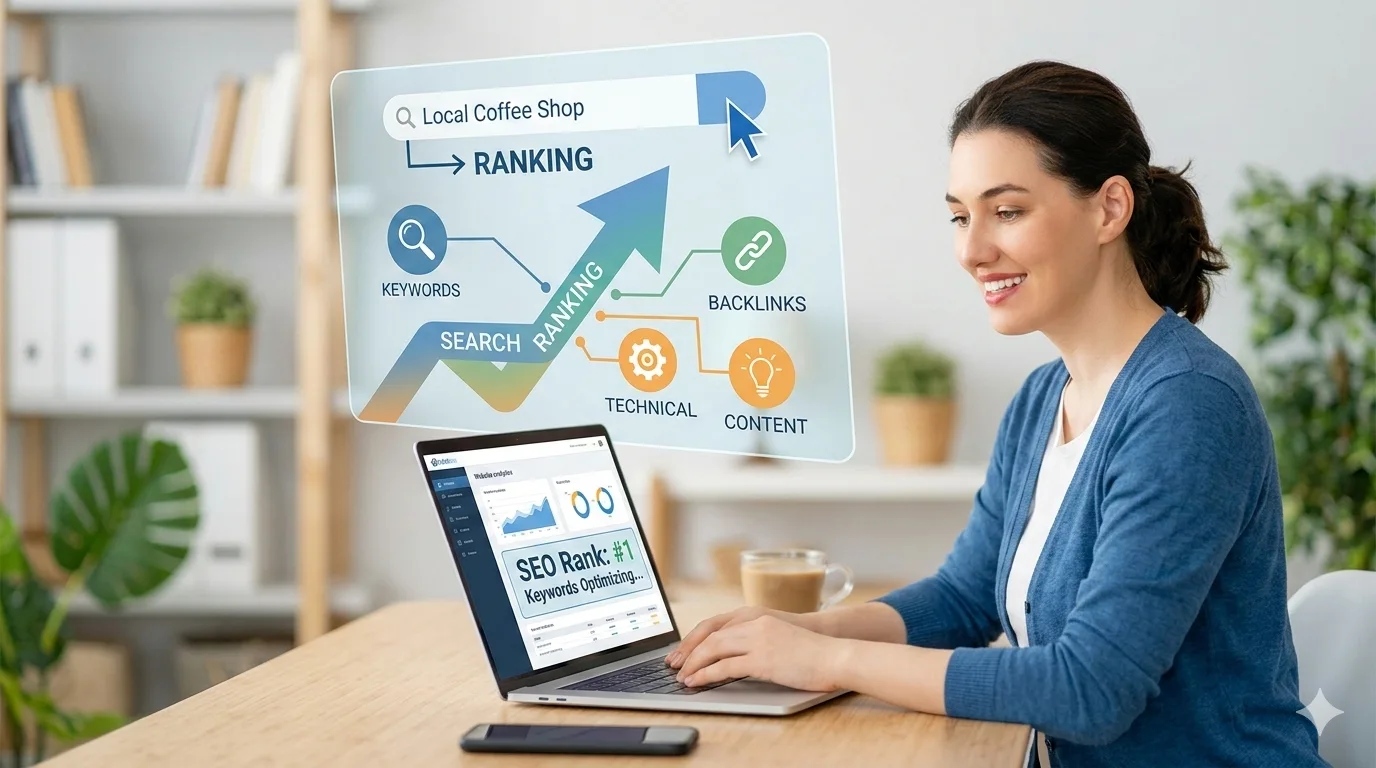
Running a small business means you’re already stretched thin. So when someone tells you to “just do SEO,” it can feel like being handed a 500-piece puzzle with no picture on the box. In this article I will breakdown the SEO Checklist for Small Business.
The real problem isn’t that SEO is impossible for small businesses. It’s that most SEO advice is written for marketing teams with full-time specialists and five-figure budgets. This guide isn’t that.
What follows is a practical checklist built from real auditing experience across retail, trades, professional services, and local industries. It cuts through the noise and focuses on what actually moves rankings, drives traffic, and turns visitors into customers in 2026.
Work through it section by section. You don’t need to do everything at once but you do need to know what matters most, and why.
What Is an SEO Checklist and Why Do Small Businesses Need One?
An SEO checklist is a structured set of tasks that keeps your website aligned with how search engines actually evaluate pages, covering technical setup, content quality, user experience, and authority building. For small business owners, it’s a practical roadmap to improve online visibility, attract the right customers, and compete with larger brands without needing an enterprise-level budget.
If you’ve never stopped to think about why SEO is important for your business, the short version is this: organic search is one of the highest-converting traffic sources available, and unlike paid advertising, the results compound over time. But only if the foundations are right.
Search engines like Google evaluate websites across hundreds of signals; technical health, content relevance, trust, and user experience all factor in. Without a structured process, it’s easy to spend months on tactics that barely move the needle while the real problems go unnoticed.
Here’s something most guides won’t say plainly: the majority of small business websites I’ve audited were losing rankings not because of a content problem, but because of a structural or technical one. Broken foundations limit everything built on top of them. Fix those first, and everything else starts to work.
What Search Engines Actually Look For
Google’s job is to return the most relevant, trustworthy result for any given query. So when you ask “how do I show up in search results?”, the honest answer is: give Google good reasons to trust your website.
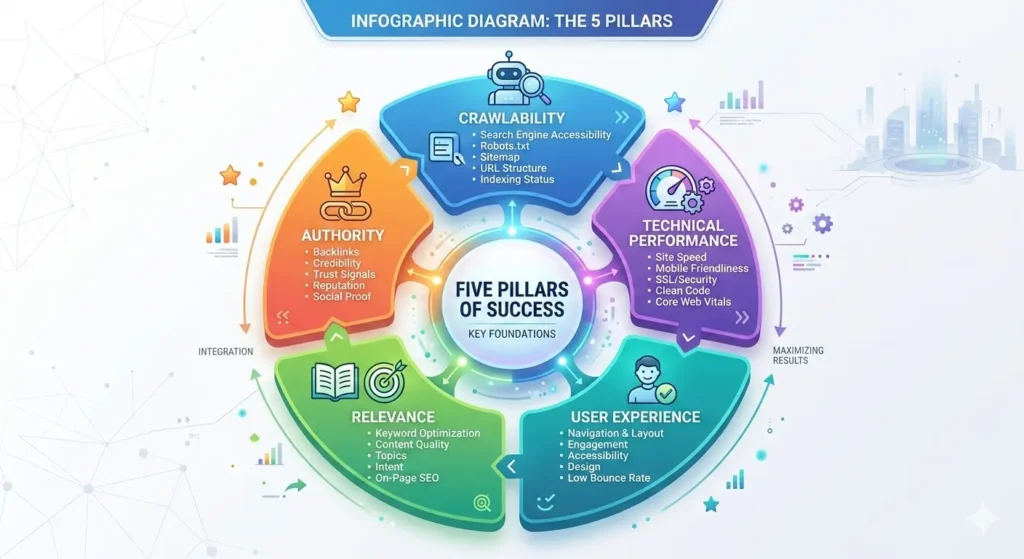
Those reasons come down to five things:
- Crawlability: Can search engine bots actually access and read your pages?
- Relevance: Does your content genuinely match what people are searching for?
- Authority: Do credible websites link back to yours?
- User experience: Do visitors engage with your site, or leave immediately?
- Technical performance: Does your site load fast, work on mobile, and follow web standards?
A good SEO checklist keeps you honest across all of these simultaneously.
How Has SEO Changed for Small Businesses in 2026?
If you last looked at SEO seriously around 2018 or 2019, a lot has shifted. Back then, placing a keyword in your title tag and earning a handful of backlinks could move rankings noticeably. That playbook is largely dead.
SEO in 2026 is less about keyword placement and more about demonstrating genuine expertise, earning trust, and being visible across AI-powered search environments, not just traditional blue-link results.
The biggest shifts worth knowing:
AI-powered search results (Google SGE) now answer many queries directly on the results page, pulling content that is clear, structured, and authoritative. If your content isn’t written to be cited, it gets skipped.
E-E-A-T (Experience, Expertise, Authoritativeness, Trustworthiness) has moved from a quality guideline to an active ranking influence. Google wants to understand who wrote your content and whether they have real experience with the topic. For small businesses, this means showcasing credentials, featuring real team members, and writing from genuine firsthand knowledge, not repurposed generic content.
Topical authority now matters more than individual page optimisation. Ranking well for high-value keywords requires your website to demonstrate depth across a topic, not just one polished page. A single blog post rarely ranks in isolation anymore.
Entity-based search means Google increasingly understands businesses as entities recognising your brand, location, people, and relationships across the web. Consistency in how your business name, address, and phone number appear online is now an SEO factor, not just a local listing concern.
User experience signals including Core Web Vitals, mobile usability, and engagement metrics, directly influence whether pages rise or fall in rankings.
| What Worked in 2018 | What Works in 2026 |
|---|---|
| Keyword-stuffed pages | Semantically rich, intent-matched content |
| High volume of thin blog posts | Fewer, deeper content clusters |
| Quantity of backlinks | Quality and relevance of backlinks |
| Basic mobile compatibility | Full Core Web Vitals compliance |
| Generic service pages | Location-specific, experience-driven pages |
The opportunity for small businesses is real. Niche authority is easier to build at a local or industry-specific level than competing nationally. A small business that owns its corner of the internet will consistently outrank larger brands that spread themselves too thin.
What Are the Most Important SEO Foundations Every Small Business Must Set Up?
Before optimising content or building links, your technical and indexing foundations must be solid. Skipping this step is like painting walls before fixing the damp, it looks fine briefly, then falls apart.
These aren’t exciting tasks. But they are the difference between a website that ranks and one that doesn’t. If you want to go deeper on the technical side, a full technical SEO audit will surface issues that a basic checklist can miss.
✅ Google Search Console Set up and verify your website in Google Search Console. This free tool shows which queries bring traffic, which pages are indexed, and which errors are blocking your visibility. Every small business needs this, no exceptions.
✅ Google Analytics (GA4) Install GA4 to understand where your visitors come from, which pages they visit, how long they stay, and whether they convert. Without this, you’re optimising blind.
✅ XML Sitemap Submission Create an XML sitemap listing all your important pages and submit it via Search Console. This tells Google what to crawl and index. I’ve worked with businesses who spent months creating content that simply wasn’t indexed because this one step was skipped.
✅ Robots.txt Configuration Your robots.txt file tells search engine crawlers which parts of your site to access and which to ignore. A misconfigured robots.txt can accidentally block your entire website from Google. Check yours carefully.
✅ HTTPS Security If your site still runs on HTTP, fix this immediately. Google treats HTTPS as a ranking signal, and users (rightly) distrust sites without it. Your hosting provider or developer can usually handle this in under an hour.
✅ Mobile Responsiveness Google uses mobile-first indexing meaning it predominantly uses the mobile version of your site for ranking. If your site doesn’t work properly on a phone, your rankings will reflect that. Test on real devices, not just a resized browser window.
✅ Site Structure Your website should have a clear, logical hierarchy: homepage → category pages → individual service or product pages. This helps users navigate and helps search engines understand how your pages relate to each other.
✅ Clean URL Structure URLs should be short, descriptive, and readable. yoursite.com/services/bathroom-renovation is good. yoursite.com/page?id=47&ref=3 is not.
How Should Small Businesses Do Keyword Research in 2026?
Keyword research now focuses on search intent, topic clusters, and the specific language your customers use, not just search volume numbers. Chasing high-volume keywords without considering intent is one of the most common and costly mistakes small businesses make.
Start with search intent. Every keyword falls into one of four categories:
- Informational: The person wants to learn something. (“how to fix a leaking tap”)
- Navigational: They’re looking for a specific brand or website.
- Commercial: They’re comparing options before buying. (“best plumber in Manchester”)
- Transactional: They’re ready to act. (“emergency plumber Manchester”)
For most small businesses, transactional and commercial keywords generate leads. Informational keywords build authority and attract top-of-funnel visitors. You need both but prioritise based on your current goals.
How to find the right keywords:
Step 1: List your core services in plain language. Don’t use internal jargon. Use the words your customers actually use when they’re searching.
Step 2: Add location modifiers. For local businesses, combining services with geography is often where the best opportunities live. “Plumber in Manchester,” “accountant in Leeds,” “wedding photographer Brighton”, these are high-intent and often far less competitive than broad national terms.
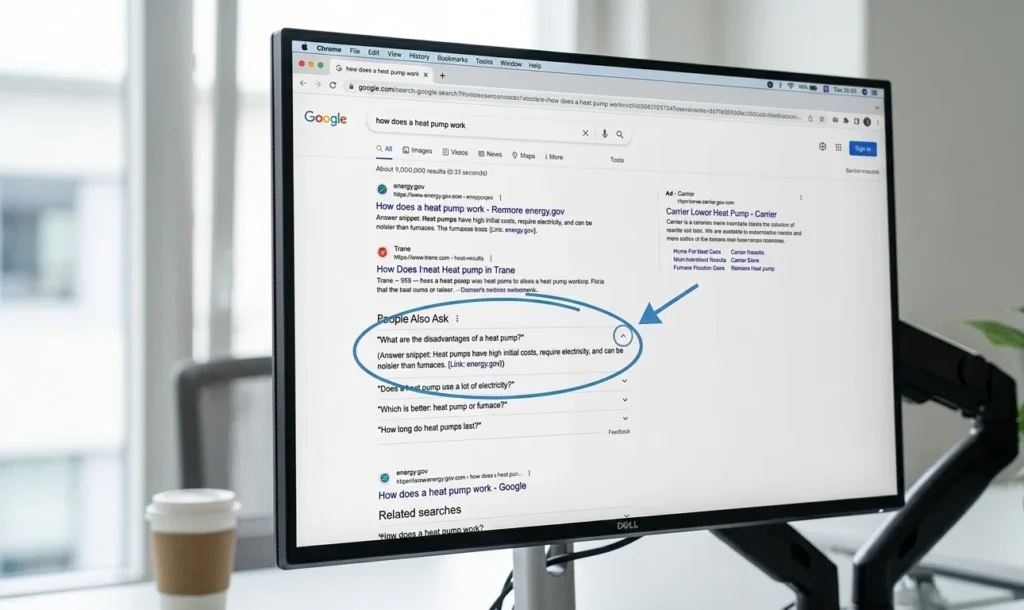
Step 3: Research question-based keywords. Google’s “People Also Ask” section, AnswerThePublic, and autocomplete suggestions reveal exactly what your potential customers are asking. These question-based keywords are particularly valuable for AI search visibility.
Step 4: Analyse competitor keywords. Look at what keywords your direct competitors rank for using tools like Semrush or Ahrefs. You’re not copying their strategy, you’re identifying gaps and opportunities they’ve left open.
Step 5: Prioritise low competition, high intent. A small business ranking on page one for “emergency boiler repair Nottingham” is worth infinitely more than page five for “boiler repair.” Target keywords where you can realistically compete and win.
The long-tail advantage for small businesses. Long-tail keywords longer, more specific phrases, typically have lower search volume but significantly higher conversion rates. Someone searching “family solicitor specialising in divorce in Bristol” is far more likely to become a client than someone searching “solicitor.” Start here. Build outward.
What On-Page SEO Elements Should Every Page Follow?
On-page SEO ensures each page clearly communicates its topic to both search engines and users. It’s not about cramming keywords into every sentence, it’s about making every page unmistakably relevant to a specific query.
✅ Title Tag The title tag is the clickable headline in search results. Keep it under 60 characters, include your primary keyword naturally, and make it compelling enough to earn the click. Don’t duplicate title tags across pages.
Example: “Bathroom Renovation Manchester | Free Quote | [Business Name]”
✅ Meta Description The meta description appears beneath your title in search results. While it doesn’t directly influence rankings, it directly influences whether someone clicks through. Write it for humans, highlight the benefit, include a call to action, keep it under 160 characters.
✅ H1 Heading Every page should have exactly one H1. It’s the main heading on the page, should include your primary keyword, and should clearly tell the user what the page is about.
✅ H2 and H3 Subheadings Structure your content with logical subheadings. These help users scan, help Google understand your content structure, and are frequently used as the basis for featured snippets. Write them as real user questions where it makes sense.
✅ Keyword Placement (Natural, Not Forced) Include your primary keyword in the title, H1, first paragraph, and naturally throughout the body. Use related terms and synonyms. Google understands semantics now. Keyword stuffing actively hurts your rankings and reads terribly to real people.
✅ Internal Linking Link to other relevant pages on your own site using descriptive anchor text. If you mention bathroom renovations on your services overview page, link to your dedicated bathroom renovation page. Internal linking distributes authority across your site and helps users discover more of your content.
✅ Image Optimisation Every image needs a descriptive file name (not “IMG_0047.jpg”) and meaningful alt text. Compress images before uploading, oversized images are one of the most common causes of slow page speed.
✅ Content Length and Depth There’s no magic word count. Write as much as the topic genuinely requires. A local service page might be excellent at 600 words. A comprehensive guide might need 2,500. Depth and usefulness matter far more than hitting a number.
One on-page mistake worth calling out: Over-optimisation. “Our Manchester plumbers are the best plumbers in Manchester for all your Manchester plumbing needs” reads poorly, signals low quality to Google, and damages trust with real visitors. Write naturally.
What Technical SEO Issues Can Block Your Rankings?
Technical SEO is the infrastructure layer of your website, the part users rarely see but Google absolutely evaluates. Strong content on a technically poor website is like a great product in a broken shop: customers can’t get to it easily.
Understanding why an SEO audit matters is the first step. The second is actually running one.
✅ Site Speed and Core Web Vitals Google’s Core Web Vitals measure real-world user experience through three metrics:
- LCP (Largest Contentful Paint): How fast does the main content load? Aim for under 2.5 seconds.
- INP (Interaction to Next Paint): How quickly does the page respond to user input?
- CLS (Cumulative Layout Shift): Does the page jump around as it loads?
Use Google PageSpeed Insights to check your scores. Common fixes include compressing images, removing unnecessary plugins, and enabling browser caching.
✅ Mobile Usability Test on actual mobile devices. Buttons should be tappable, text readable without zooming, and forms should work correctly on touchscreens.
✅ Crawl Errors Use Google Search Console’s Coverage report to identify pages Google can’t crawl or index. Broken pages, server errors, and redirect chains all waste crawl budget and damage rankings.
✅ Duplicate Content Multiple pages with identical or very similar content confuse Google about which version to rank. Use canonical tags to designate the “master” copy, and avoid creating near-identical service area pages by swapping only the location name.
✅ Redirect Management When you delete or move a page, set up a 301 redirect to the most relevant existing page. Broken links and unresolved 404 errors create poor user experiences and leak authority.
✅ Render-Blocking Resources CSS and JavaScript that loads before the page content slows everything down. Google’s PageSpeed tool will flag these. Work with your developer to defer non-critical scripts.
Recommended tools for technical auditing: Screaming Frog (free up to 500 URLs), Google Search Console (free), PageSpeed Insights (free), Ahrefs Site Audit, or Semrush Site Audit.
How Should Small Businesses Structure Their Content for SEO?
Publishing random blog posts on unrelated topics is a content strategy that rarely works in 2026. The businesses gaining real organic traction are building structured topic clusters — interconnected groups of content that collectively establish authority on a subject.
The pillar and cluster model:
- Pillar page: A comprehensive, authoritative page covering a broad topic in depth. Often a core service page or an ultimate guide. Example: “Complete Guide to Kitchen Renovation.”
- Cluster content: Focused articles that go deep on specific subtopics. Examples: “How Much Does Kitchen Renovation Cost?”, “Kitchen Renovation Timeline: What to Expect”, “Best Kitchen Layouts for Small Homes.”
- Internal links: Every cluster article links back to the pillar, and the pillar links out to the clusters. This signals topical depth to Google.
A practical example. A home renovation business might build clusters around kitchen remodelling (pillar) → costs, timelines, design trends, mistakes to avoid (clusters). Then bathroom renovation, then flooring. Each cluster reinforces the others and builds overall topical authority in that space.
Don’t overlook existing content. New content isn’t always better than improved existing content. Revisiting older pages — refreshing statistics, adding new sections, improving internal links, deepening coverage — can revive rankings that have drifted. This is especially true for pages targeting time-sensitive queries.
What Role Do Backlinks Play in Small Business SEO?
Backlinks links from other websites pointing to yours, remain one of Google’s strongest ranking signals. They function as trust votes: when a credible website links to yours, it signals to Google that your content is worth referencing.
Not all backlinks are equal. One link from a respected local newspaper or industry publication is worth more than hundreds of low-quality directory submissions.
How to build quality backlinks as a small business:
Local partnerships and sponsorships. Sponsor a local event, sports team, or community initiative. Most organisations publish acknowledgements online with a link. These local backlinks are highly relevant and genuinely earned.
Supplier and partner listings. If you’re an accredited installer for certain brands, or a member of an industry association, you’ll often qualify for a listing on their website with a backlink.
Digital PR. Offer your expertise to local journalists or bloggers covering topics in your industry. A quote in a relevant article often comes with a link. HARO (Help a Reporter Out) connects experts with journalists actively seeking sources.
Guest posting. Contributing articles to relevant industry blogs or local business publications can earn quality backlinks. Focus on genuine value — thin content written purely for a link rarely works and can backfire.
Broken link building. Identify websites in your industry that link to pages that no longer exist (using Ahrefs or Check My Links). Reach out and suggest your relevant content as a replacement. You’re solving a problem for the website owner — which makes it a warm outreach, not a cold ask.
It’s also worth understanding how nofollow links factor into your overall link profile, they’re not as useless as some people assume.
A strong warning about cheap link building. Avoid any service offering “100 backlinks for £50.” Paid link schemes and private blog networks violate Google’s guidelines. At best, they do nothing. At worst, they trigger a penalty that can devastate your rankings. The shortcuts always cost more in the long run.
How Important Is Local SEO for Small Businesses?
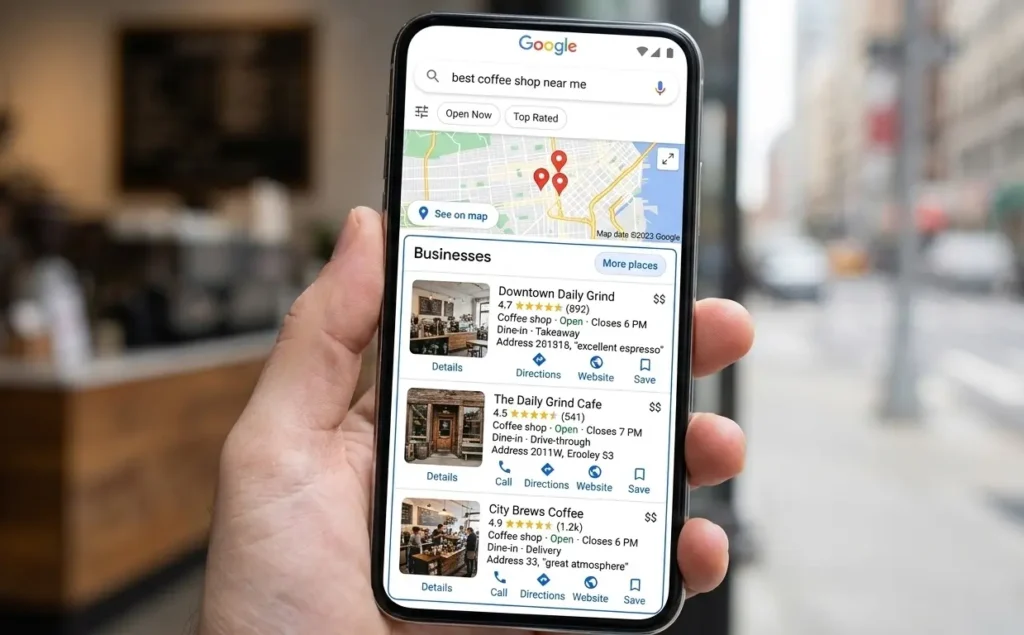
For any business serving a specific geographic area, local SEO is often the single highest-return SEO investment available. Appearing in Google Maps and the local “3-pack” drives calls, visits, and enquiries directly, often converting better than any other traffic source.
✅ Google Business Profile (GBP) Optimisation Your Google Business Profile is the foundation of local SEO. Complete every field accurately: business name, address, phone number, website URL, categories, business description, opening hours, and services. Add high-quality photos businesses with photos receive significantly more engagement.
Respond to every review, positive and negative. Regular posts and updates on your GBP signal to Google that your listing is actively managed.
✅ NAP Consistency NAP stands for Name, Address, and Phone Number. These details must be identical across your website, Google Business Profile, and every directory listing online. Inconsistencies confuse Google about your business’s identity and location and they do matter.
✅ Local Citations Citations are mentions of your business details on directories, review platforms, and listing sites. Ensure you’re listed consistently on key platforms relevant to your industry. Quality and consistency matter more than quantity.
✅ Customer Reviews Reviews influence both rankings and click-through rates. A business with 80 reviews and a 4.7 rating will consistently attract more customers than a competitor with 12 reviews, even if the competitor ranks slightly higher. Build a simple, repeatable process for asking satisfied customers to leave a Google review.
✅ Local Landing Pages If you serve multiple locations, create dedicated landing pages for each, written genuinely for that area, not a copy-paste page with only the location name swapped. Include local references, area-specific services, and unique content on each page.
A real-world example. A restaurant that invested three months in review management actively requesting feedback from happy customers and responding to all reviews within 24 hours, increased its Google Maps visibility by over 60% without changing anything else. Reviews are one of the most underused local SEO levers available.
What SEO Tools Should Small Business Owners Use?
You don’t need expensive tools to do effective SEO, but having the right ones saves significant time and makes the difference between guessing and knowing.
Free tools (start here):
- Google Search Console: Monitor indexing status, search performance, and technical errors. Non-negotiable.
- Google Analytics 4: Track traffic sources, user behaviour, and conversion data.
- Google PageSpeed Insights: Analyse site speed and Core Web Vitals.
- Google Business Profile: Manage and optimise your local presence.
- Screaming Frog SEO Spider (free up to 500 URLs): Crawl your website to identify technical issues.
- Ubersuggest (limited free tier): Basic keyword research and competitor analysis.
Paid tools (worth the investment when ready):
- Ahrefs or Semrush, Comprehensive keyword research, backlink analysis, rank tracking, and site auditing. Both start around £100–£120/month. Semrush is often preferred for content research; Ahrefs is generally stronger for backlink data.
- Surfer SEO or Clearscope, Content optimisation tools that analyse what top-ranking pages include and help you match or exceed that coverage.
- BrightLocal, Specifically built for local SEO management, citation tracking, and review monitoring.
If you’re just getting started, the free tools will take you further than most people realise. Invest in paid tools once the fundamentals are in place and you’re producing content consistently enough to need the additional data.
What Are the Most Common SEO Mistakes Small Businesses Make?
After auditing hundreds of small business websites, the same mistakes come up repeatedly. Knowing them upfront saves months of wasted effort.
Ignoring search intent. Publishing content that doesn’t match what people actually want when they search a keyword is the most common reason pages don’t rank. A page about “how to install underfloor heating” will not rank for “underfloor heating cost” — even though both terms seem related. Match the page to the intent of the specific query.
Thin or generic content. Service pages that say little more than “we offer high-quality service at competitive prices with excellent customer service” tell Google nothing useful. Write content that reflects real expertise — what the process involves, what problems you solve, what questions clients typically ask.
Skipping technical foundations. Many businesses dive into content and link building while their website has unresolved crawl errors, a broken mobile experience, or pages that aren’t even indexed. Fix the foundations first. Every time.
Buying low-quality backlinks. The appeal of a fast shortcut is understandable. The reality is that low-quality backlinks at best waste money and at worst trigger a Google manual penalty that can remove your website from search results entirely.
Not tracking performance. If you’re not monitoring rankings, traffic, and conversions, you have no idea what’s working. Set up Search Console and Analytics, establish a baseline, and check in monthly. SEO without measurement is guesswork with extra steps.
Expecting instant results. SEO is a compounding investment, not a fast-return channel. Businesses that abandon their strategy after two months because they “didn’t see results” typically quit just before momentum would have started building.
How Long Does SEO Take for Small Businesses to See Results?
Most small businesses begin seeing noticeable SEO results within 3–6 months of consistent effort. Meaningful traffic and lead generation often becomes clearer at the 6–12 month mark, depending on competition and starting position.
Factors that affect your timeline:
Competition level. A local electrician in a small town can reach page one within weeks. A digital marketing agency competing nationally might take 12–18 months to see significant movement.
Domain history. A website with an established domain, existing backlinks, and prior SEO work will build momentum faster than a brand-new domain starting from zero.
Content production frequency. Businesses publishing two to four well-optimised pieces per month consistently outpace those who publish sporadically.
Technical starting point. A website with serious technical issues needs those resolved before rankings improve — which adds time.
| Timeframe | What Typically Happens |
|---|---|
| Month 1–2 | Technical fixes, foundations setup, keyword research, initial pages optimised |
| Month 3–4 | Google begins registering improvements; ranking movement for lower-competition terms |
| Month 5–6 | Noticeable traffic increases; rankings consolidating for targeted keywords |
| Month 7–12 | Compounding growth; authority building; higher-competition keywords becoming reachable |
| 12 months+ | Sustained traffic, lead flow, and topical authority in your niche |
These are general benchmarks. Results vary based on your industry, location, budget, and consistency. Anyone promising page-one results within 30 days is not being honest with you.
What Does SEO Cost for Small Businesses?
SEO investment varies widely depending on whether you handle it yourself, hire a freelancer, or work with an agency. The right level of investment depends on your industry competitiveness, growth ambitions, and current website state.
DIY SEO — Cost: £0–£200/month (tools only) If you have the time and willingness to learn, handling your own SEO is entirely viable for local and low-competition businesses. The learning curve is real, but the free resources available are genuinely excellent. Search Console and Analytics are free; a mid-tier paid tool adds £100–£120/month. Best for: Early-stage businesses, low-competition local markets, owner-operators with time to invest.
Freelance SEO Consultant — Cost: £500–£2,000/month A skilled freelance consultant offers a more personal approach than an agency and often has lower overheads. Quality varies enormously — always ask for case studies, check references, and be cautious of anyone who can’t clearly explain what they’ll actually do each month. Best for: Small businesses that want professional guidance without agency fees.
SEO Agency Retainer — Cost: £1,000–£5,000+/month Agencies bring broader capacity technical SEO, content, and link building working in tandem. At the lower end, some agencies take on too many clients and deliver templated, low-effort work. At the higher end, you should expect a dedicated account team, clear reporting, and measurable outcomes. Best for: Businesses in competitive markets with meaningful growth budgets.
One rule regardless of budget: Always retain access to your own Search Console and Analytics accounts. Never allow an agency or freelancer to own your data. If the relationship ends, your historical performance data and access must stay with you.
Step-by-Step SEO Checklist for Small Business Owners
Use this as your working action plan. Prioritise in order, foundations come first.
Phase 1: Foundations
- [ ] Set up and verify Google Search Console
- [ ] Install Google Analytics 4
- [ ] Generate and submit your XML sitemap
- [ ] Review and configure your robots.txt
- [ ] Confirm your site is on HTTPS
- [ ] Test mobile responsiveness on real devices
- [ ] Set up Google Business Profile fully
- [ ] Check Core Web Vitals in PageSpeed Insights
- [ ] Crawl your site for errors (Screaming Frog)
- [ ] Fix crawl errors and broken links
2nd Phase : Keyword and Content Strategy
- [ ] List all core services and products
- [ ] Research keywords for each service with intent in mind
- [ ] Identify local keyword variations
- [ ] Research question-based keywords for each topic
- [ ] Map keywords to existing or planned pages (one primary keyword per page)
- [ ] Plan a pillar and cluster content structure for each main service
Phase 3: On-Page Optimisation
- [ ] Optimise title tags on all key pages
- [ ] Write compelling meta descriptions for all key pages
- [ ] Ensure every page has a single, keyword-informed H1
- [ ] Structure body content with logical H2 and H3 headings
- [ ] Add descriptive alt text to all images
- [ ] Compress and resize images
- [ ] Add internal links between relevant pages
- [ ] Improve content depth on thin pages
Phase 4: Local SEO
- [ ] Complete every field in your Google Business Profile
- [ ] Upload 10+ quality photos to GBP
- [ ] Verify NAP consistency across all listings
- [ ] Audit and fix inconsistent citations
- [ ] Create a process for requesting customer reviews
- [ ] Respond to all existing reviews
- [ ] Create local landing pages if serving multiple areas
5th Phase: Link Building and Authority
- [ ] Identify local partnership and sponsorship opportunities
- [ ] Claim listings on relevant industry directories
- [ ] Reach out for supplier or association backlinks
- [ ] Set up a Google Alert for brand mentions
- [ ] Identify guest posting opportunities in your niche
Phase 6: Ongoing Monitoring
- [ ] Set up monthly rank tracking for target keywords
- [ ] Review Search Console weekly for new issues
- [ ] Monitor Analytics for traffic trends and conversions
- [ ] Review and update older content quarterly
- [ ] Track new content performance monthly
- [ ] Monitor and respond to new reviews
If you need any local seo expert to dominate your business in local search results, we are here to help you.
When SEO Might Not Be the Right Primary Channel
SEO is powerful, but it’s not always the fastest answer to every business problem.
If you need leads immediately, SEO won’t deliver within days or weeks. Paid advertising, Google Ads or Meta Ads, generates traffic the moment campaigns go live. For a new business needing immediate revenue, running paid ads alongside SEO is often the smartest approach: ads fund the business while SEO builds long-term organic value.
If your market is extremely competitive and your budget is limited, start with a tightly defined niche or geographic focus. Trying to rank for “accountant UK” against established national firms with a small budget is a near-impossible battle. Start where you can win, build authority, and expand from there.
If your product or service has very low search demand, SEO will have limited impact regardless of how well it’s executed. Social media, partnerships, and content marketing on platforms where your audience already exists may deliver better results.
SEO works best as a medium-to-long-term foundation within a broader digital marketing strategy, not as a standalone overnight solution.
Frequently Asked Questions
Is SEO still worth it for small businesses in 2026?
Yes, decisively. Organic search remains one of the highest-converting traffic sources available, and unlike paid advertising, the results compound over time rather than stopping the moment you stop spending. For any business where customers search online before buying, SEO is infrastructure, not optional.
How many keywords should a small business target?
Start with one primary keyword per page, plus a handful of related secondary terms. A website with 20–30 well-optimised pages targeting specific, intent-matched keywords will consistently outperform a site with 200 pages of thin, unfocused content. Depth and focus beat volume.
Can small businesses do SEO themselves?
Yes, particularly for local or low-competition niches. The fundamentals are learnable, the best tools include free options, and small consistent effort applied over months produces real results. The main constraint is time, if you’re already running a business at full capacity, self-managing SEO may not be realistic without delegating something else.
How often should SEO be updated?
Technical foundations should be checked monthly via Search Console. Content should be reviewed and refreshed quarterly. New content should be published regularly, ideally two to four times per month for businesses actively building authority. SEO is not a one-time project; it’s an ongoing process.
What is the fastest SEO win for small businesses?
Optimising your Google Business Profile is the fastest meaningful SEO win available to any local business. Most profiles are incomplete, have missing photos, and haven’t been actively managed. Completing every field, uploading strong photos, and beginning to gather and respond to reviews can improve local visibility within weeks, faster than almost any other single action.