
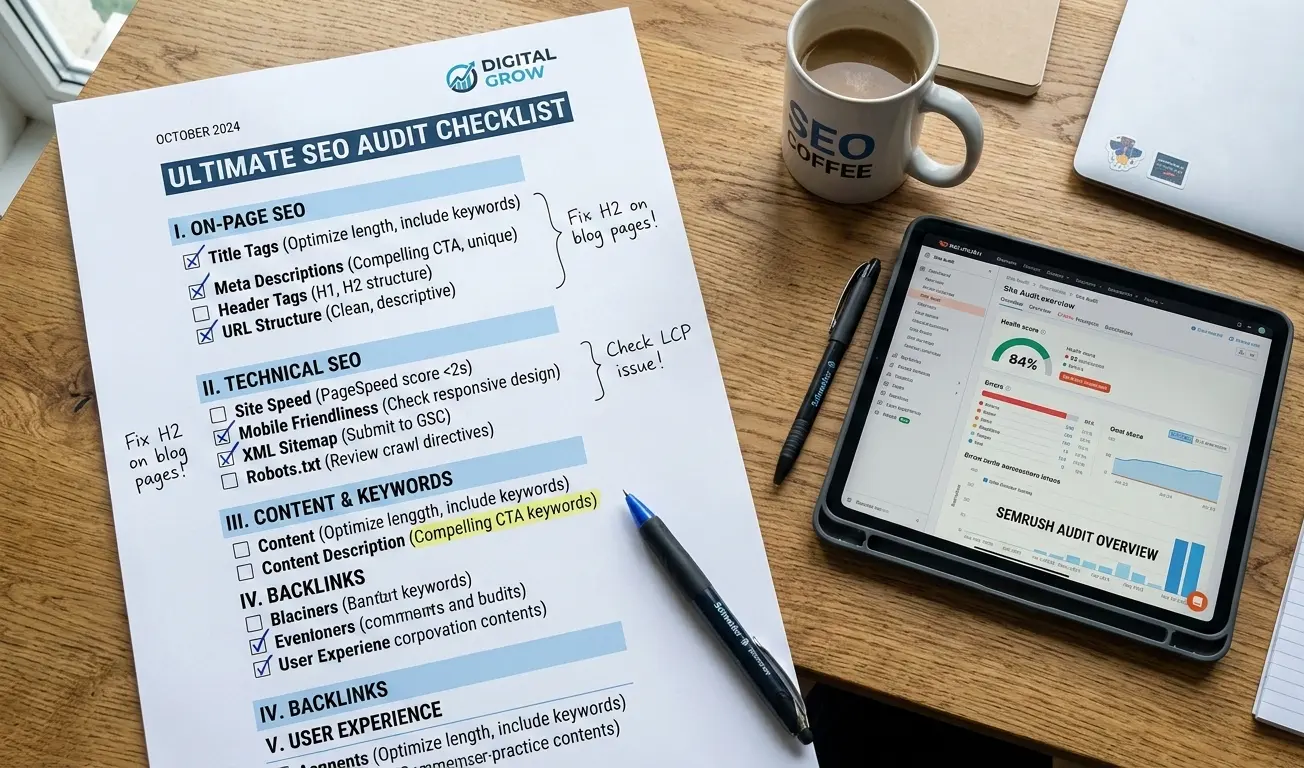
A technical SEO audit is one of the most valuable things you can do for a website, and one of the most misunderstood.
Most SEOs know they should be doing them. Far fewer actually know what they’re looking for, or how to decide what to fix first. This guide is built around how professional SEOs actually work through an audit: not a generic checklist, but a real prioritized process that reflects what happens in practice.
What Is a Technical SEO Audit?
At its core, a technical SEO audit is a structured analysis of how well search engines can crawl, index, and understand your website. It focuses on infrastructure: site speed, URL structure, crawlability, indexing signals, security. Not your content or keyword strategy.
That distinction matters. Technical SEO and on-page SEO are often lumped together, but they are different problems. On-page SEO is about what your content says. Technical SEO is about whether search engines can reach it at all.
Here is a real example of why this matters: I have audited sites with strong content, solid backlinks, and no rankings, because a developer had accidentally blocked the entire domain in the robots.txt file after a migration. The content was fine. The technical foundation was broken. Google could not see any of it. A technical audit is what catches that.
Why Technical SEO Affects Your Rankings
Search engines have to do three things with your site: crawl it, index it, and rank it. Technical problems can break any one of those steps, sometimes silently, which is what makes them dangerous.
The categories of issues that most commonly affect rankings:
- Crawlability: Bots cannot reach pages due to robots.txt blocks, broken internal links, or noindex tags applied in the wrong places
- Indexing errors: Pages that should be indexed are not, or low-value pages that should not be indexed are eating up your crawl budget
- Core Web Vitals: Slow load times and visual instability hurt rankings and drive up bounce rates
- Mobile usability: Google indexes the mobile version of your site first; a broken mobile experience is a ranking problem
- HTTPS and security: Insecure pages or mixed content warnings undermine trust signals and can prevent proper rendering
- Structured data: Missing or broken schema cuts you out of rich result eligibility
Of all these, indexing issues tend to have the biggest impact in real audits. A site that is not indexed correctly cannot rank, regardless of how much content or link authority it has. If you want to understand why an SEO audit is important beyond just rankings, the downstream effects on crawl efficiency and site health are just as significant.
When Should You Run a Technical Audit?
Regularly, and after anything significant changes.
Good trigger points include: a sudden or gradual organic traffic drop with no clear explanation, a completed site migration or redesign, a major Google algorithm update, switching CMS platforms, or launching a new SEO campaign where you need a clean starting point.
For ongoing maintenance, the rough cadence most SEOs follow:
- Small sites (under 500 pages): every 6 months
- Medium sites (500 to 10,000 pages): quarterly
- Large and enterprise sites: monthly crawl monitoring, with a full audit every 1 to 2 quarters
The biggest mistake I see is treating an audit as a one-time project. Sites are constantly changing: new pages get added, plugins update, developers push code. Something that passed your last audit may be broken today.
What Tools You Actually Need
You do not need every tool on the market. Here is what professional SEOs actually rely on.
The non-negotiables:
Google Search Console is your first stop. It is free, and it shows you exactly how Google sees your site: indexing data, crawl errors, Core Web Vitals reports, manual actions. All of it.
Screaming Frog SEO Spider is a desktop crawler that mimics how search engine bots move through your site. It is the best tool for finding broken links, redirect chains, duplicate content, missing tags, and crawl depth issues.
Google PageSpeed Insights measures Core Web Vitals using real user data from the Chrome UX Report, not just lab simulations.
Ahrefs or Semrush Site Audit are cloud-based crawlers that complement Screaming Frog, especially useful for larger sites or continuous monitoring.
Worth adding:
- Screaming Frog Log Analyzer or Splunk for seeing exactly what Googlebot is visiting and how often
- Google’s Rich Results Test for validating structured data
- SSL Labs for certificate and HTTPS configuration checks
One thing worth understanding: Google Search Console shows you what Google has already found. Screaming Frog shows you what can be found. You need both perspectives for a complete picture.
The Audit Process, Step by Step
Step 1: Crawlability
Before anything else, confirm search engines can actually reach your site.
Start at yourdomain.com/robots.txt. Verify nothing important is accidentally blocked: directories, assets, key page types. Blocking /wp-admin/ is expected; accidentally blocking / is catastrophic. It happens more often than you would think, usually after a migration.
In Google Search Console, check Settings > Crawl Stats for frequency and errors. The Coverage report will show pages Google has excluded. Some will be intentional; others will be surprises worth investigating.
In Screaming Frog, crawl the full site and filter for pages blocked by robots.txt. Also check crawl depth: your most important pages should be reachable within 3 to 4 clicks from the homepage. Pages buried deeper get crawled less frequently and accumulate less internal link equity.
Do not overlook orphan pages, which are pages with no internal links pointing to them. If Googlebot can only find a page through your XML sitemap and never through a natural internal link, it is unlikely to be prioritized. Weak internal linking is one of the most underrated crawlability issues in practice.
Step 2: Indexing
A page can be crawled and still not indexed, or indexed when it should not be. These are separate problems.
In Search Console’s Coverage report, pay attention to pages categorized as “Crawled but not currently indexed” and “Discovered but currently not indexed.” Both mean Google found the page but decided not to include it. The causes vary, and so do the fixes.
Run a crawl in Screaming Frog and filter for noindex directives. Look specifically at your important page types: category pages, product pages, landing pages. Noindex tags applied unintentionally are more common than they should be.
Canonical tags are where a lot of indexing problems quietly live. A canonical tag tells Google which URL is the preferred version of a page. When they are misconfigured, pointing to the wrong URL, creating circular references, or simply absent where they should exist, duplicate content issues follow. Check that self-referencing canonicals are in place on unique pages, and that no canonical is pointing away from a page you want to rank.
Other common sources of duplicate content: pagination, URL parameters, www vs. non-www, HTTP vs. HTTPS, and trailing slash variations. A single piece of content accessible through four slightly different URLs is a quiet indexing problem most site owners never notice.
Step 3: Site Architecture
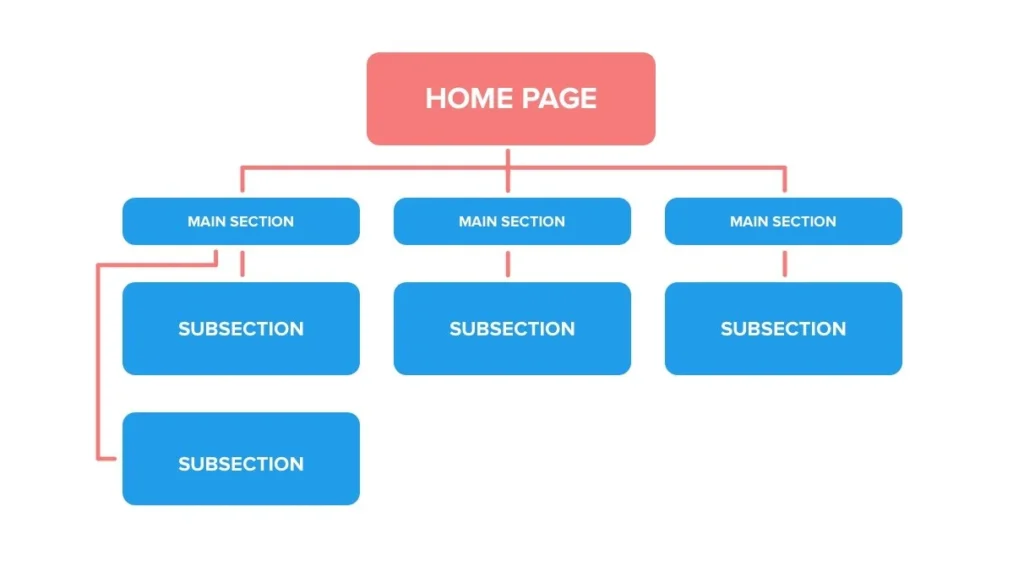
How your site is structured affects both how Google navigates it and how link equity flows through it.
URLs should be clean, descriptive, and consistent. Avoid parameter-heavy dynamic URLs where possible. Use hyphens between words, not underscores. Shorter is better, as long as it remains meaningful.
Hierarchy should follow a logical path: Homepage > Category > Subcategory > Page. Flat architectures, where most pages are 1 to 2 clicks from the homepage, work better for most sites. Deep structures where key pages are buried 5 or more clicks down dilute crawl priority and reduce the link equity those pages receive.
Internal linking is worth auditing carefully. A page you are trying to rank for a competitive keyword should have multiple contextual links pointing to it from relevant pages across your site, not just a single footer link. Pages you care about most should reflect that in your internal linking structure. Understanding how nofollow links affect your SEO is also worth considering when evaluating internal link equity flow.
Breadcrumbs are particularly valuable on e-commerce and large content sites. They reinforce hierarchy for both users and search engines. If you are using breadcrumb navigation without implementing BreadcrumbList schema alongside it, you are leaving rich result opportunities unused.
Step 4: Broken Links and Redirect Issues
Broken pages disrupt crawl efficiency and hurt user experience. They are also a reliable signal of general site health.
In Screaming Frog or Ahrefs Site Audit, filter for 4xx errors (broken pages) and 5xx errors (server problems). Export all redirect chains and flag any with more than two hops. Each hop in a chain loses a fraction of link equity and slows down crawling.
In Search Console, the Coverage report surfaces 404 errors Googlebot has encountered. Pay special attention to any 404s that previously had organic traffic or backlinks. Those URLs need 301 redirects, not just deletion.
For redirects in general: everything should go directly to the final destination URL. No chains. Redirect loops (A > B > A) need to be fixed immediately. And after any migration, verify that old URLs were actually redirected, not just abandoned.
Step 5: Page Speed and Core Web Vitals
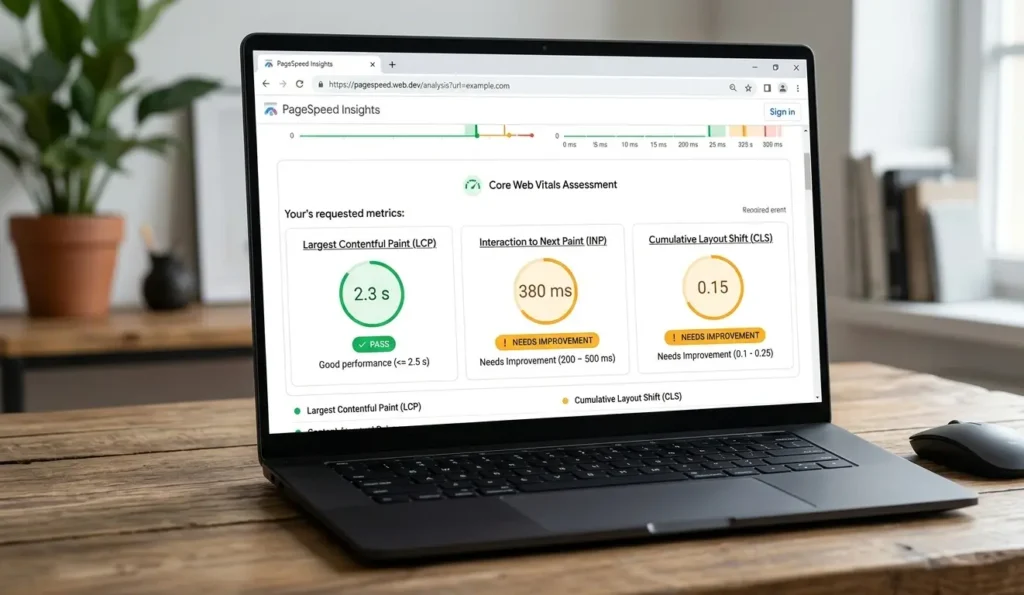
Page speed is a confirmed ranking factor. The three Core Web Vitals are how Google measures it:
- Largest Contentful Paint (LCP): How fast the main content loads. Target: under 2.5 seconds
- Interaction to Next Paint (INP): How quickly the page responds to user input. Target: under 200ms
- Cumulative Layout Shift (CLS): How much the page moves around while loading. Target: under 0.1
For ranking purposes, what matters is the field data in Search Console’s Core Web Vitals report. That is real user data aggregated across your site, which is what Google actually uses. PageSpeed Insights gives you both field data and specific recommendations for individual pages.
The usual culprits behind poor scores: unoptimized images (LCP), render-blocking JavaScript and CSS (LCP), third-party scripts like chat widgets and ad tags (INP), and dynamic content inserted without reserved space (CLS).
If your site uses a JavaScript-heavy framework such as React, Angular, or Vue, this step gets more complex. Client-side rendering can create significant crawl and performance problems. Search engines are improving at processing JavaScript, but it is slower and less reliable than server-side rendering. Compare the raw HTML Googlebot receives to the fully rendered DOM. If important content only exists after JavaScript executes, Google may miss it entirely or index it with a significant delay.
Step 6: Mobile Optimization
Google uses mobile-first indexing. That means the mobile version of your site is what Google primarily crawls and uses for ranking decisions. A broken mobile experience is a ranking problem, full stop.
Run key pages through Google’s Mobile-Friendly Test. Check Search Console > Mobile Usability for site-wide problems. In Screaming Frog, crawl using a mobile user agent to see what Googlebot Mobile actually sees.
Common issues: misconfigured viewport meta tags, fonts too small to read without zooming, clickable elements packed too close together, and intrusive interstitials on mobile (which Google specifically penalizes).
One thing many auditors miss: make sure your mobile version contains the same content as your desktop version. Some sites serve stripped-down mobile pages with less text and fewer internal links, which means Google is indexing the less comprehensive version. If that is happening on your site, it is costing you rankings.
Step 7: Structured Data
Structured data helps search engines understand what your content represents, and it is what makes rich results possible: star ratings, FAQ dropdowns, product panels, and more.
Validate with Google’s Rich Results Test and the Schema.org Validator. Check Search Console’s Enhancements section for schema-specific reports.
The schema types worth prioritizing:
- Organization: Establishes brand entity information
- Product: Enables price, availability, and review rich results
- FAQ: Expands your search result with Q&A directly in the SERP
- Article: Useful for news and editorial content
- BreadcrumbList: Reinforces site hierarchy signals
- LocalBusiness: Essential for any business with a physical location
One thing to keep in mind: implementing schema makes you eligible for rich results, but does not guarantee them. Google decides whether to show them. What you can control is making sure your markup validates cleanly and is applied to the right pages.
Step 8: Security and HTTPS
HTTPS has been a ranking signal since 2014. More practically, a non-secure site or a browser security warning kills user trust before a visitor reads a single word.
Verify that all pages load over HTTPS, that HTTP URLs redirect to HTTPS (not the other way around), that your SSL certificate is valid and not approaching expiration, and that canonical tags use HTTPS URLs.
The sneaky issue here is mixed content: pages that load over HTTPS but reference HTTP resources like images, scripts, or stylesheets embedded in the page. This often survives site migrations because hardcoded HTTP references in the CMS content are not updated automatically. It is worth a dedicated crawl pass just for this. Browser DevTools will flag it with a warning symbol in the address bar, and Screaming Frog can filter for HTTP resources on HTTPS pages.
Use SSL Labs for a full certificate and configuration check.
Common Mistakes That Catch Site Owners Off Guard
After running hundreds of audits, these are the problems I see most consistently, and they reliably surprise the people who own the sites.
Accidentally blocking pages in robots.txt. A developer blocks a directory on staging, the change gets pushed to production, and entire site sections vanish from search results. This happens constantly.
Conflicting canonical tags. Page A canonicalizes to page B, but page B canonicalizes to page C. Search engines often give up and index neither version as intended.
Over-indexing thin or low-value pages. Pagination, filtered product listings, tag archives, and internal search result pages can add thousands of low-quality URLs to your index. This wastes crawl budget and can drag down your site’s perceived quality.
Leaving critical content in JavaScript. Navigation, body content, and internal links should all be present in the raw HTML. Anything that requires JavaScript execution to appear may not be seen reliably by search engines.
Redirect chains from old migrations. Every redesign adds another layer. URL A redirects to B, B redirects to C, C redirects to the live page. Each hop costs crawl efficiency and leaks link equity.
Advanced Techniques for Deeper Audits
Once you have covered the fundamentals, a few techniques help you go further, particularly on large or complex sites.
Log file analysis is the most underused tactic in technical SEO. Server logs record every request made to your server, including every Googlebot visit. Analyzing them reveals which pages get crawled frequently, which get ignored, and which are wasting your crawl budget. This is ground truth: more reliable than any third-party crawler’s estimate.
Crawl budget optimization matters once you are dealing with tens of thousands of pages. You want Googlebot spending its allocation on your important, indexable content, not paginated archives, parameter variations, or low-value tag pages. Block unimportant URL patterns via robots.txt, apply noindex to low-value pages, consolidate duplicates via canonicals, and improve server response times.
JavaScript SEO analysis for framework-heavy sites means comparing the raw HTML (what Googlebot sees at crawl time) against the fully rendered DOM (what users actually see). If critical content only appears after JavaScript executes, you have a visibility problem that may explain rankings that do not make sense.
Faceted navigation and index bloat is a specific challenge for e-commerce. Filter combinations can generate millions of unique URLs (size=medium&color=red&brand=nike), most of which should never be indexed. The right approach, whether canonicals, noindex, or parameter handling, depends on your catalog structure. But doing nothing is expensive at scale.
How Long Does a Thorough Audit Take?
| Site Size | Page Count | Typical Time |
|---|---|---|
| Small | Under 500 pages | 2 to 4 hours |
| Medium | 500 to 10,000 pages | 1 to 2 days |
| Large | 10,000 to 100,000 pages | 1 to 2 weeks |
| Enterprise | 100,000+ pages | 2 to 4 weeks |
These ranges assume a real audit, not just running a tool and exporting a CSV. Time increases significantly if log file analysis is involved, if the site is JavaScript-heavy, or if the CMS is custom-built. Writing up findings, prioritizing recommendations, and estimating impact often takes as long as the discovery work itself.
Do You Need an Expert?
For straightforward sites on standard platforms such as WordPress, Shopify, or Wix, a non-specialist can conduct a meaningful audit using Search Console and Screaming Frog. Many common issues are easy to identify once you know what to look for, and the tools surface most of them clearly.
Where experience genuinely makes a difference:
JavaScript-heavy sites: Rendering issues require understanding how frameworks behave, not just what the tool reports. Post-migration cleanup: Redirect auditing and re-indexing after major migrations is high-stakes work with real consequences if done wrong. Algorithm recovery: Diagnosing why a site lost traffic after a Google update requires pattern recognition that comes from having seen it before, multiple times.
If you are unsure whether to handle this in-house or bring in help, it is worth reading up on what SEO consulting actually involves before making that call. A practical middle ground: run the audit yourself with good tools, then have an experienced SEO review the findings and help you prioritize. The tools surface the data; the expertise is in knowing which data actually matters.
A well-executed technical audit is also a foundational part of why SEO delivers long-term value for businesses. Getting the technical foundation right is what allows everything else, content, links, authority, to compound over time.
Frequently Asked Questions
How often should a technical SEO audit be done?
Large sites should run audits every 3 to 6 months, with crawl monitoring between formal audits. Smaller sites can manage with annual audits plus spot-checks after major site changes.
What is the difference between technical SEO and on-page SEO?
Technical SEO is the infrastructure layer: how search engines access, crawl, and index your site. On-page SEO is the content layer: keywords, headings, copy, internal linking. Technical is the foundation; everything else is built on top of it.
What is the most common technical SEO problem?
Indexing issues and slow page speed. Indexing problems are particularly insidious because the site looks fine in a browser; you need Search Console to see what Google actually sees.
Do technical fixes affect rankings immediately?
It depends on the issue. Blocking a page in robots.txt can tank rankings within days once Googlebot re-crawls. Speed improvements show ranking impact over weeks. Indexing cleanup on large sites can take months to fully surface in search results.
What is the difference between a technical audit and a full SEO audit?
A technical audit covers infrastructure: crawlability, indexing, speed, security, and architecture. A full SEO audit adds on-page analysis (content quality, keyword alignment) and off-page analysis (backlink profile, domain authority). The technical audit is typically the first phase.